Aurora GO LauncherEX Theme v1.0
Requirements: Android 2.0 and up
Overview: Features: Currently 30+ icons, Wallpaper of the topic, The weather widget named”Weather forecast”on the screenshot
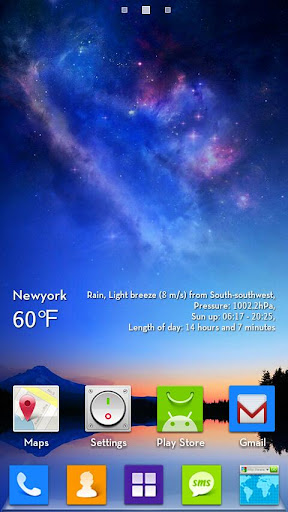

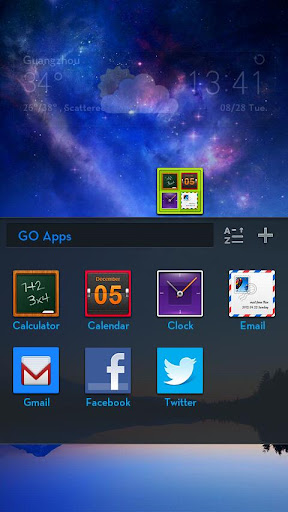
Notice:
GO launcher theme is only available for phones with GO Launcher EX installed.
Search a€œGO Launcher EXa€ on Google Play Shop and install it for free.
***How to Apply the Theme
1. Directly open the theme after successful installation.
2. or back to Menu>Theme, choose a theme you like and apply it to your phone.
***How to Change Wallpaper
Click Menu>Wallpaper, and select the wallpaper you like.
***How to Change App Icons
(Some devices might not automatically apply the icons)
Long press some app icon>Replace>Themea€™s icon, and then choose the icon you like.
More Info:
Download Aurora GO LauncherEX Theme v1.0, via http://rapidgator.net/
Download Aurora GO LauncherEX Theme v1.0, via http://www.rapidfileshare.net/
Requirements: Android 2.0 and up
Overview: Features: Currently 30+ icons, Wallpaper of the topic, The weather widget named”Weather forecast”on the screenshot
 |
| Aurora GO LauncherEX Theme v1.0 |
GO launcher theme is only available for phones with GO Launcher EX installed.
Search a€œGO Launcher EXa€ on Google Play Shop and install it for free.
***How to Apply the Theme
1. Directly open the theme after successful installation.
2. or back to Menu>Theme, choose a theme you like and apply it to your phone.
***How to Change Wallpaper
Click Menu>Wallpaper, and select the wallpaper you like.
***How to Change App Icons
(Some devices might not automatically apply the icons)
Long press some app icon>Replace>Themea€™s icon, and then choose the icon you like.
Code:
https://play.google.com/store/apps/details?id=com.gau.go.launcherex.theme.F.auroraDownload Aurora GO LauncherEX Theme v1.0, via http://rapidgator.net/
Download Aurora GO LauncherEX Theme v1.0, via http://www.rapidfileshare.net/

